What a proxy is, in one minute
A proxy is a go-between on the internet. Instead of the 1xBot server talking to 1xBet directly, the connection passes through an address that you choose, and that is the address 1xBet sees. Think of it as a home address for your connection.
Why it matters: 1xBet only opens for visitors from the countries it serves, and an account that suddenly shows up from somewhere new gets extra checks. With your own proxy in your own country, 1xBet sees your account arrive from the same familiar place every time.
Do you need one?
- You only use the free signals: no. Signals, live matches and statistics work without a proxy and without a 1xBet account.
- You are on Pro and want to connect your 1xBet account: most likely yes. If the connection screen tells you that 1xBet cannot be opened from the server's location, a proxy is the fix.
- You already connected 1xBet and everything works: there is nothing to change.
Which proxy to choose
You rent a proxy from a proxy provider. Two we recommend are proxy-seller.com and dataimpulse.com; both sell proxies for every region, so you can pick the country of your 1xBet account. These are recommendations only, not partnerships: 1xBot has no agreement with either of them and does not sell proxies itself. Any other provider works too, as long as the proxy passes this checklist:
- Country: the country of your 1xBet account — the one you really live and bet in. This is the most important point.
- Type: residential or mobile. These are the addresses of ordinary home and phone connections. Data-centre proxies are cheaper, but 1xBet often refuses them.
- Protocol: HTTP or HTTPS. SOCKS proxies (SOCKS4, SOCKS5) do not work on 1xBot.
- A steady address: choose a static IP or a "sticky" session that keeps the same address for as long as possible, not one that changes on every request.
- Size: the smallest plan is usually enough to start. Only signing in and your own account's requests — balance, placing bets — go through your proxy. Signals and live odds do not.
Write the address in the right form
Your provider gives you four things: a host (a name or an IP address), a port (a number), a username and a password. 1xBot wants them on one line, in this order:
http://username:password@host:port
- Example: host
proxy.example.com, port8000, usernameannaand passwords3cretbecomehttp://anna:s3cret@proxy.example.com:8000 - Many providers show it as
host:port:username:password. Those are the same four pieces — just move them into the order above. - Start the line with
http://. That is the right choice for almost every provider. - No spaces anywhere. The
@separates your login from the host, and the:separates the two halves on each side. - If your proxy password contains
@,:,/or#, the line breaks. The easy fix is to set a password made only of letters and numbers at your provider.
Connect it on 1xBot, step by step
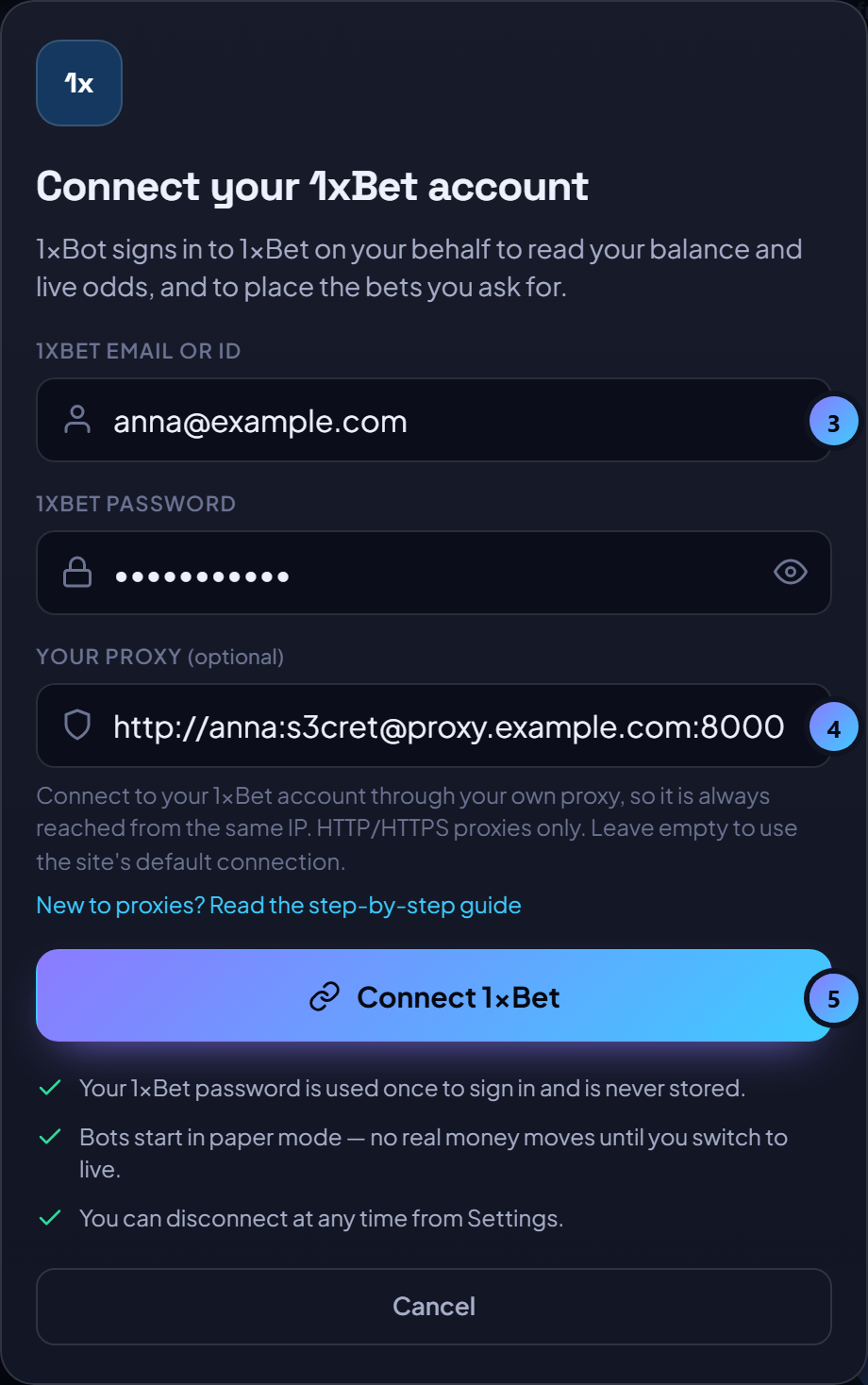
- Sign in to 1xBot and open the dashboard. Connecting 1xBet is part of the Pro plan.
- Press "Connect 1xBet" in the top bar.
- Type your 1xBet email or ID and your 1xBet password.
- Paste your proxy line into the field called "Your proxy".
- Press "Connect 1xBet" and wait. 1xBot first checks that your proxy answers, then opens 1xBet through it. Through a home connection this can take up to a minute — that is normal.
- If 1xBet asks to confirm that it is you, type your phone number, press "Send code" and enter the code from the SMS.
- Done. In Settings, the 1xBet card now shows "Your proxy" next to Route.
Your proxy password is stored encrypted and is never shown in full again — the form shows dots instead. To move to another proxy later, open Settings, press "Reconnect", replace the line and connect again.
If something goes wrong
- The site says the proxy is not in the right form: check the order of the four pieces and the
http://at the start, and make sure it is not a SOCKS proxy. - The site says the host name does not resolve: there is a typing mistake in the host. Copy it again from your provider.
- The site could not connect through your proxy: the proxy did not answer. Check the port, the username and the password, and that your plan at the provider is active and still has data.
- The proxy reached 1xBet but was refused: the proxy works, but 1xBet does not accept that address. Ask your provider for another IP, or move from a data-centre proxy to a residential or mobile one.
- 1xBet refuses the location of your proxy: it is in a country 1xBet does not serve. Choose your own country at the provider.
- It keeps loading for a long time: slow proxies happen. Try once more; if it is slow every time, ask the provider for a faster address.
Keep it safe and simple
- Use a proxy that only you use. Free proxy lists are slow, shared with strangers and usually blocked already.
- Keep the same proxy. Changing address or country often is exactly what makes 1xBet ask for new checks.
- Use the country you really live in and where your 1xBet account was opened. The proxy gives your account a steady home address; it is not a way around 1xBet's country rules.
- Renew the proxy before it runs out. If it expires, the bots cannot reach your account until the proxy works again.
Questions and answers
Is a proxy the same as a VPN?
They do a similar job, but one cannot replace the other here. A VPN app changes the connection of your own phone or computer; it does nothing for the 1xBot server. The proxy field needs a proxy address from a proxy provider.
Can I use a free proxy?
It is not worth it. Free proxies are slow, shared with strangers and usually already blocked by 1xBet. A small paid residential plan in your own country is the reliable choice.
Do I need a proxy for the free signals?
No. Signals, live matches and statistics need no proxy and no 1xBet account. The proxy is only for connecting your own 1xBet account on the Pro plan.
Can 1xBot see my proxy password?
It is stored encrypted on the server and used only to reach 1xBet for your account. On screen it is replaced by dots once it is saved.
Updated Monday, 5 October 2026